 ThingzSafe
Web portal · Household / Pro
Add and edit Things on the web
Use your shared ThingzSafe inventory from a browser on a computer, tablet or phone.
Create and update a Thing
- Choose Things and open the add form, or navigate into a Site or Area first. Enter a name and choose the appropriate location and Category.
- The Things list defaults to Owned: Active and On loan Things appear; Sold and Disposed are filtered out. Choose All to include every status. Their cards use a silver background.
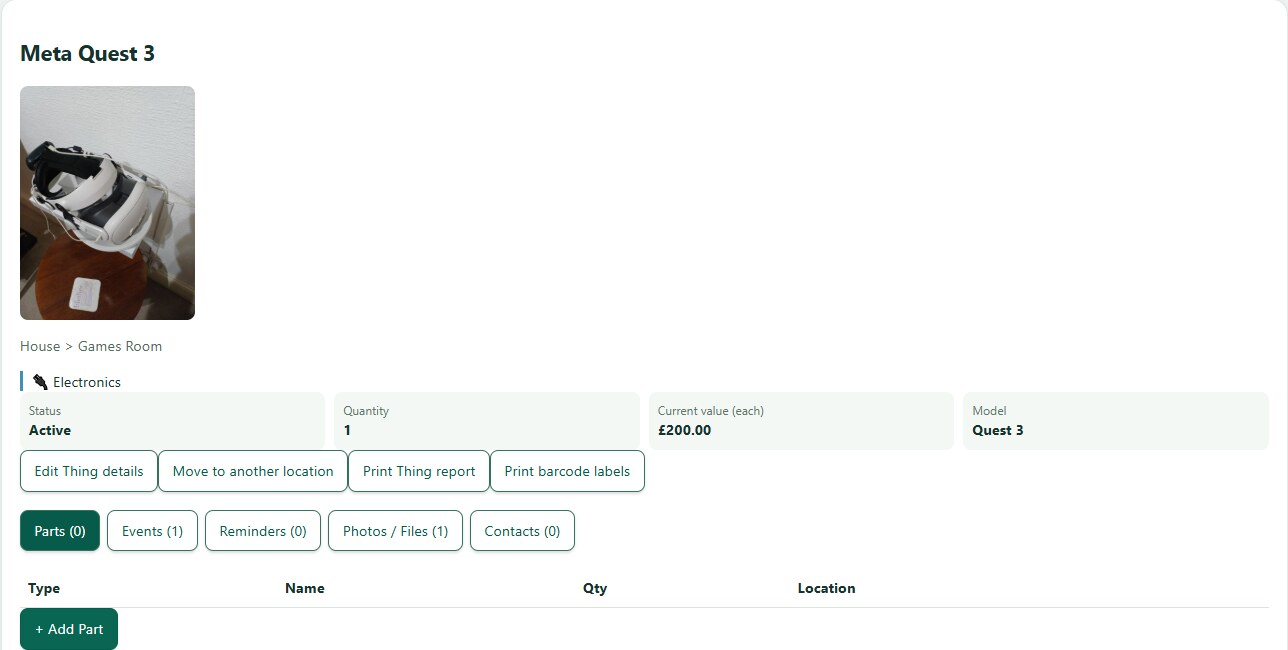
- Open a Thing and choose Edit. Review purchase details, quantity, status, warranty and current value, then save. Prices and current values are per item; totals multiply by quantity.
Contents and Parts
- Open Contents or Parts on the Thing when enabled by its Category. Add or edit entries under the correct parent. Contents are held items or stock; Parts are fitted components. Parts costs do not add to normal insurance valuation.
- To print labels from a Thing, its Contents label action lists Contents belonging to that Thing. The global label action is for the inventory-wide list. Check quantities and format before printing.
Photos and files
- Open Photos and files to view the Thing’s images and documents. Add files to this Thing, then open a photo for a larger view or download an original document.
- A file attached to the parent Thing is separate from files attached to its Contents or Parts. Check the selected record before uploading.
Events and reminders
- Open Events to view dated maintenance, service notes and receipts. Use Add event to record something that happened; use Calendar to schedule a future action.
- Open Calendar to add an event or recurring reminder, and use the reminder list filters to review past, upcoming or all dates. Edit warranty dates on the Thing itself.
Contacts
- Open Contacts, choose an existing person and select Link contact beside the dropdown. The person must already be in household People and devices. Linking does not send an invitation or grant portal access.
- Add a household contact first if needed. Removing a link from a Thing does not delete that person from the household.
Need more help or have a suggestion? Contact us.